
Preface: We are all still groping in the dark
To be honest, for the past three months, I’ve been spinning around in the world of AI Agent development.
Sometimes I feel like I’ve made something—skills can run, images can be generated, documents can be translated. But then a couple of days later, I find the code is a mess, the SKILL.md is stuffed with various emergency patches, and fixing one bug requires changing three unrelated pieces of code.
I kept asking myself: How do you actually write an Agent skill that can withstand real-world scenarios?
Until yesterday, when I saw an article titled “5 Agent Skill design patterns every ADK developer should know” posted by GoogleCloudTech on X. At that moment, it was like seeing light at the end of a dark tunnel—it turned out that the pits I had stepped into could have been avoided with mature patterns; and the practices I had been exploring in the beaver-skill project actually corresponded to certain “best practices.”
Reading the theory and then looking back at my own code gave me a sense of confirmation: “So what I did back then was right,” as well as a sense of regret: “If I had known this concept earlier, I could have written it better.” I really wanted to share this.
If you are also exploring the path of Agent development, I hope this article can help clarify some of your thoughts. We are all fellow travelers exploring the new era of AI together.
First, a complete overview
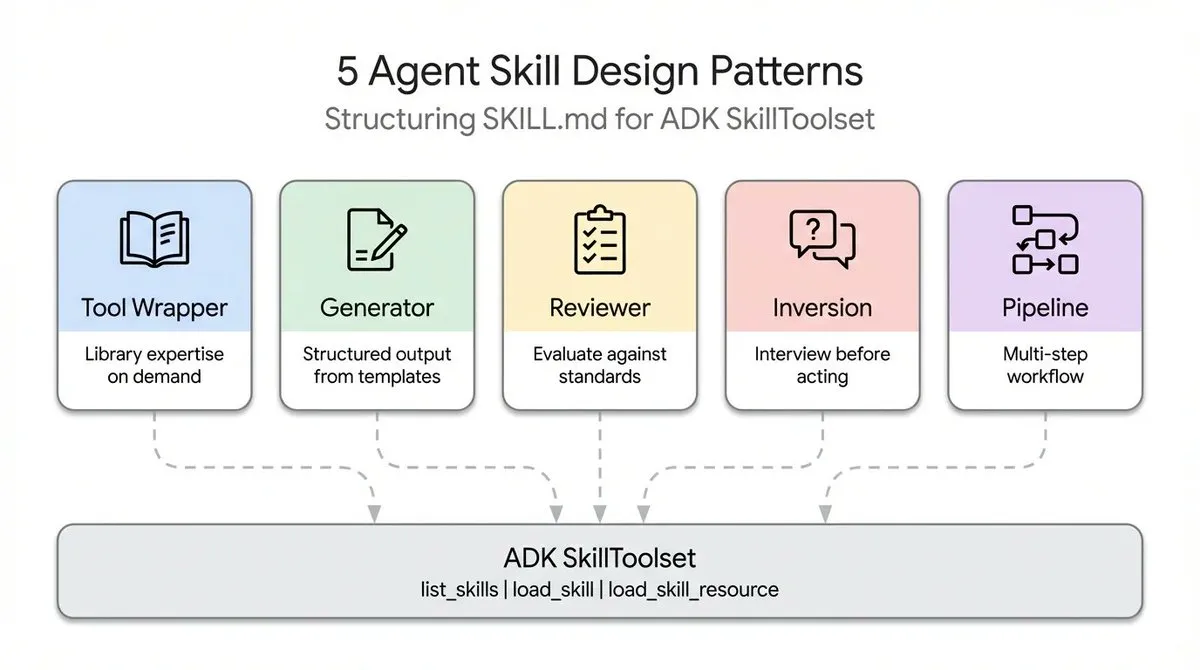
I’ve actually used all five of these patterns in the beaver-skill project—I just didn’t know they were “patterns” at the time; I just felt they were “more reasonable.” After reading the theory and comparing it with my code, I finally understood the essence of each pattern.
| Design Pattern | My Problem at the Time | What the Theory Says | How I did it in beaver-skill |
|---|---|---|---|
| Tool Wrapper | API docs all stuffed into SKILL.md, file getting longer | Externalize library docs, load on demand | Multi-platform abstraction in beaver-image-gen |
| Generator | Generation style inconsistent every time | Use templates + style guides to force uniform output | 9x6 style matrix in beaver-cover-image |
| Reviewer | Never written a review skill | Externalize review criteria, replaceable | An extensible pattern |
| Inversion | Always guessing user needs | Let the agent be the interviewer, ask clearly before acting | Double confirmation process in beaver-xhs-images |
| Pipeline | Doing everything at once, start over if error | Multiple checkpoints, confirm each step | Translation pipeline in beaver-markdown-i18n |
Next, I want to talk about each pattern—starting from the pits I stepped into, to the epiphany when I saw the theory, and then reflecting on my own code.
Pattern 1: Tool Wrapper—Turns out API docs don’t have to be in SKILL.md
The pit I stepped into
When I first started writing beaver-image-gen, I wrote the API documentation for Nano and OpenAI directly into SKILL.md. The result was:
- The file got longer and longer, and you had to scroll for a long time to find the actual logic.
- To support a new platform, a large chunk of instructions had to be added to
SKILL.md. - Rules for different platforms got mixed up, often leading to errors.
At that time, I thought: Can I separate platform-related documentation?
So I created a scripts/providers/ directory and split each platform’s conventions into independent files. At the time, I just thought it was “cleaner,” not knowing it was the Tool Wrapper pattern.
What the theory says
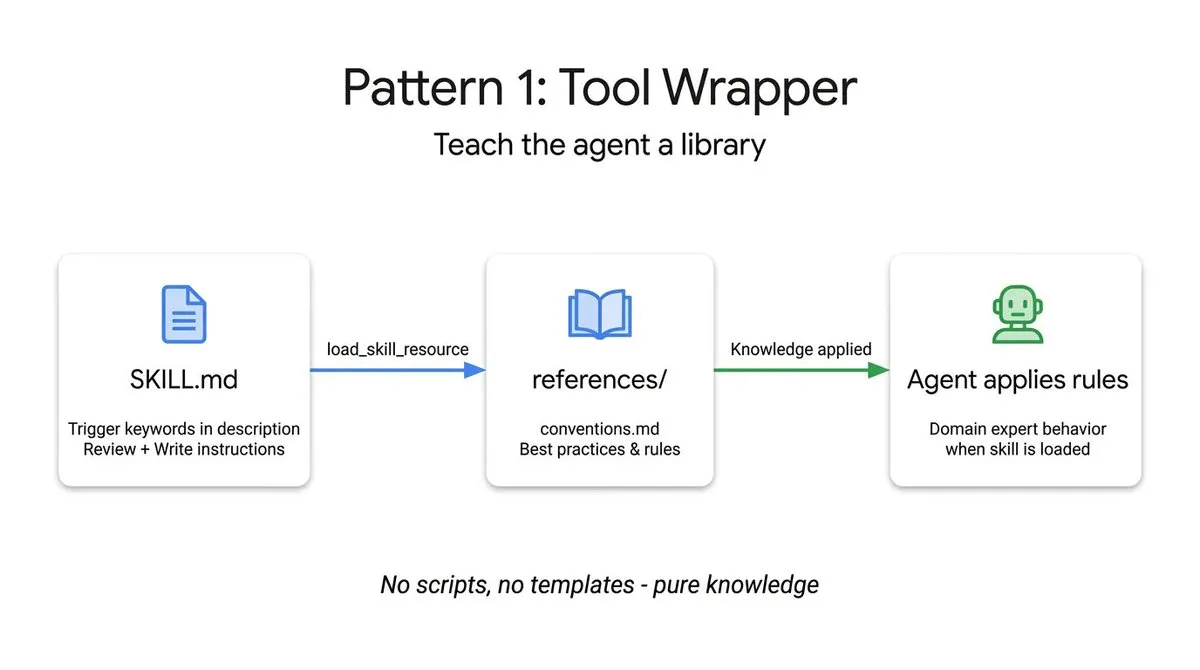
The core of the Tool Wrapper pattern is just one sentence: Let the agent become an instant expert in a specific library, but don’t hardcode the library docs into the code.
Key points:
- Externalized Knowledge Base—Library docs maintained separately.
- Dynamic Loading—Load whichever library is needed.
- On-demand Context—Don’t cram all docs into the agent at once.
Implementation in beaver-skill
beaver-image-gen/├── scripts/providers/│ ├── google.ts│ ├── openai.ts│ ├── dashscope.ts│ └── replicate.ts├── main.ts└── SKILL.mdEach platform’s API conventions are independent TypeScript modules. Looking back now, my intuition was right.
Comparing with the theory, what I did right:
| Theoretical Element | My Implementation | Code Location |
|---|---|---|
| Externalized Knowledge Base | Independent file for each platform | scripts/providers/*.ts |
| Dynamic Loading | detectProvider() automatic selection | main.ts |
| On-demand Context | Using If Google... conditional instructions in SKILL.md | SKILL.md |
Areas for improvement looking back
Although the direction was right, after reading the theory, some parts could be optimized:
| Previous Approach | New Idea |
|---|---|
| Directly return provider after detection | Can add a fallback mechanism for friendlier failure detection |
| Conditional instructions in SKILL.md | Consider moving prompt templates into providers as well |
| No metadata description for providers | Can add version numbers, supported features, etc., for easier extension |
I will add these improvements in the next iteration.
Pattern 2: Generator—Stop letting AI improvise
The pit I stepped into
Before writing beaver-cover-image, I tried letting the AI generate covers directly. The result was painful: the style was different every time, color matching often failed, and there was no unified visual language.
I thought: Can I have a “style recipe” and follow it every time?
What the theory says
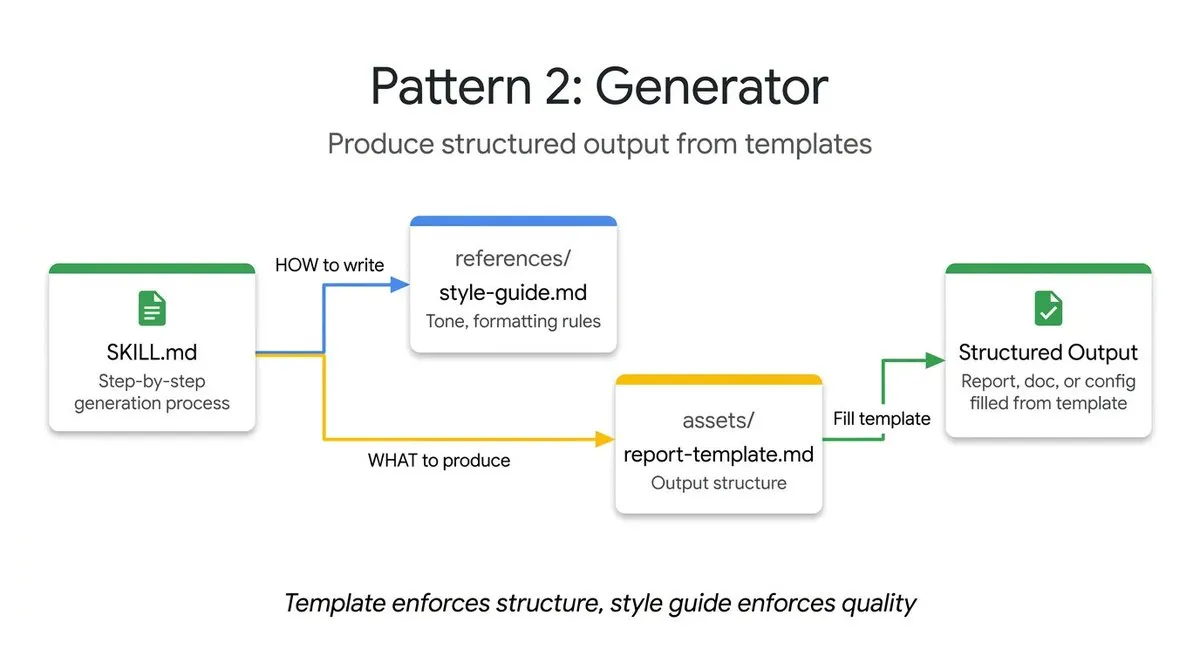
The core of the Generator pattern is: Use templates + style guides to force consistent output format.
Key points:
- Template Storage—Output templates placed in
assets/. - Style Guide—Format rules placed in
references/. - Filling Process—The agent is only responsible for filling variables, not free creation.
Implementation in beaver-skill
beaver-cover-image/├── assets/ # Templates│ ├── template-cinematic.md│ └── template-square.md├── references/ # Style Guides│ ├── palettes/ # 9 color palettes│ └── styles/ # 6 rendering stylesComparing with the theory, my thinking at the time:
| Theoretical Element | beaver-skill Implementation | Location |
|---|---|---|
| Template Storage | Templates for different aspect ratios | assets/template-*.md |
| Style Guide | 9 color palettes × 6 rendering styles | references/palettes/ + references/styles/ |
| Filling Process | Sequential collection: Title → Subtitle → Visual Elements → Style | Generation flow in SKILL.md |
Areas for improvement looking back
| Previous Approach | New Idea |
|---|---|
| Style configuration is a yml file | Consider adding a visual selector |
| No recording of user history preferences | Can integrate EXTEND.md to remember commonly used styles |
| Style combinations are fixed at 54 | Can allow “semi-customization”—fixed palette, fine-tuned style parameters |
Pattern 3: Reviewer—Haven’t done it yet, but I know how to do it now
My current status
To be honest, I haven’t implemented the Reviewer pattern in beaver-skill yet. Every code review is still done manually, or I let the AI scan it directly without a fixed checklist.
After reading the theory, I realized the problem: Review standards are all in the head, different every time, and not easy to pass on.
What the theory says
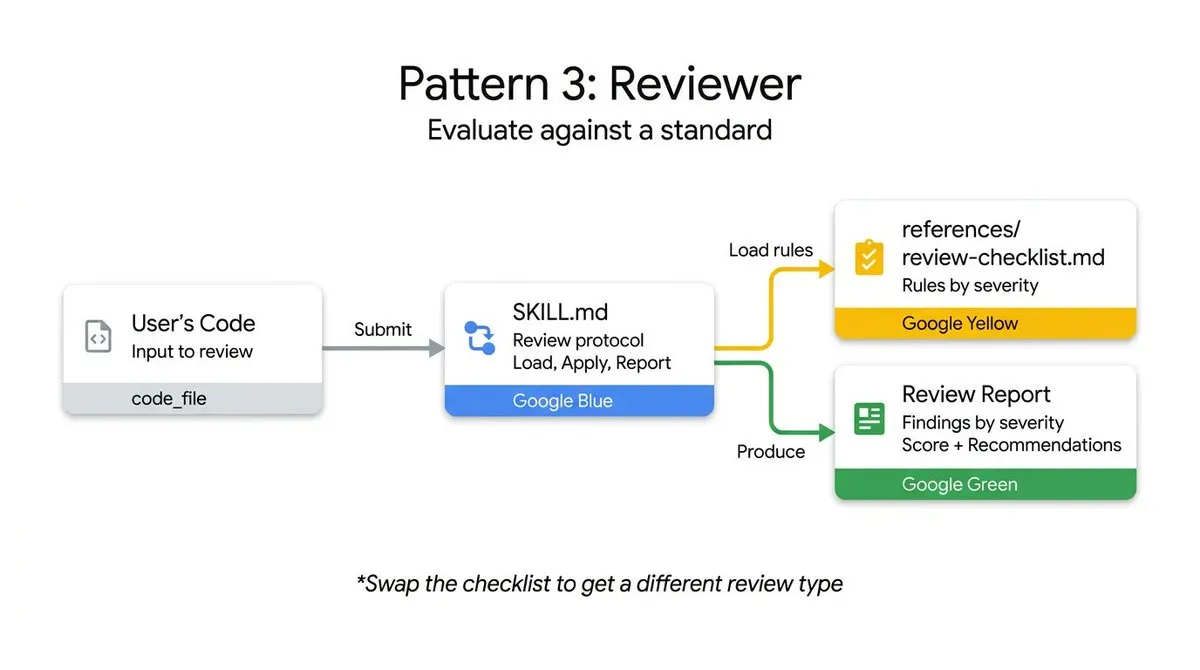
The Reviewer pattern is simple: Externalize the checklist, group by severity, and make it flexible to replace.
Key points:
- Externalized Standards—Review rules in independent files.
- Severity Grouping—Three levels: error/warning/info.
- Replaceable Checklist—Same framework can switch between different standards.
If I were to add a Reviewer skill
Now I know how to design it:
code-reviewer/├── references/│ ├── checklists/│ │ ├── typescript-style.md│ │ ├── owasp-security.md│ │ └── performance.md│ └── severity-guide.md└── SKILL.mdCore Process:
- Load the corresponding checklist based on parameters.
- Check the code line by line.
- Output grouped by severity: error (must fix) / warning (suggested fix) / info (hint).
This skill is already on my TODO list.
Pattern 4: Inversion—Stop guessing, just ask
The pit I stepped into
When doing beaver-xhs-images, I initially kept trying to “intelligently infer” what style the user wanted. The result? Often inferred wrong, generating a lot of content that didn’t suit their taste.
Later, I just stopped guessing and asked directly—the effect was much better.
What the theory says
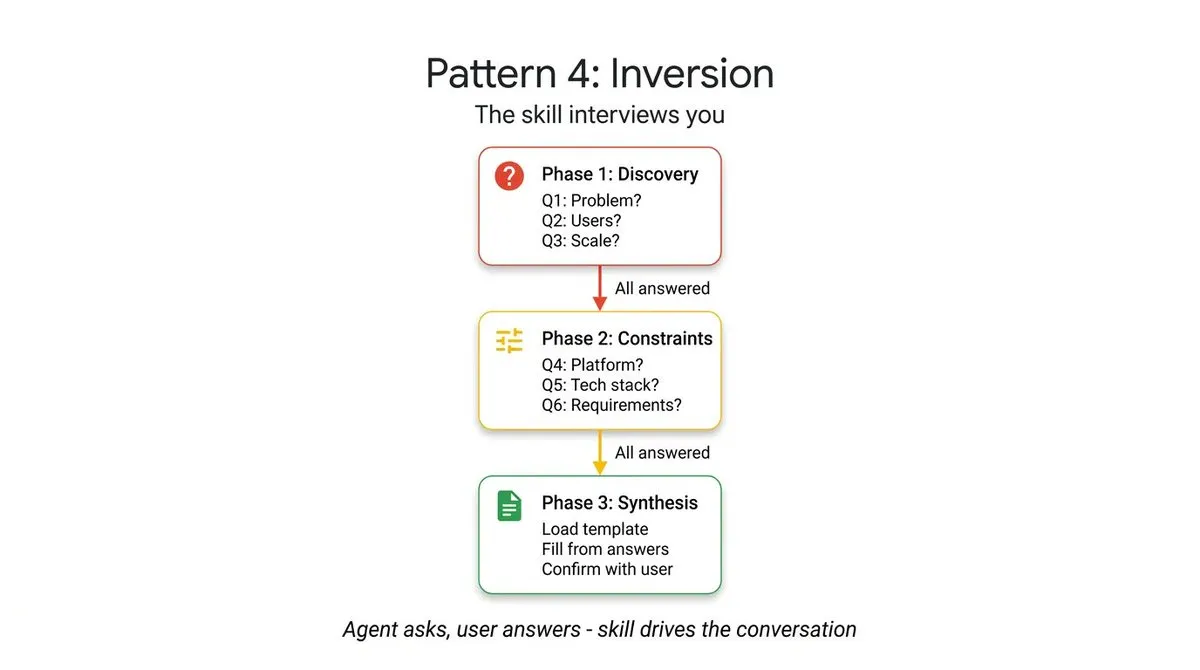
The Inversion pattern flips traditional thinking: The agent is not the executor, but the interviewer.
Key points:
- Gating Instructions—⛔ Must be completed to continue.
- Phase-based Collection—Needs confirmed in multiple stages.
- Full Picture—Act only after ensuring information is complete.
Implementation in beaver-skill
Step 0: Preference Check ⛔ BLOCKING  ├─ Check EXTEND.md  └─ Force initial setup if it doesn't exist
Step 2: Confirm Content Understanding ⚠️ REQUIRED  ├─ Show extracted topics  └─ Wait for user confirmation
Step 4: Confirm Style ⚠️ REQUIRED  ├─ Show selected outline and style  └─ Wait for user confirmation
Two confirmation points, which is much more reliable than my initial direct generation.
Comparing with the theory, looking at my design:
| Theoretical Element | Implementation in beaver-skill | Location |
|---|---|---|
| Gating Instructions | ⛔ BLOCKING, initial setup must be completed | Step 0 |
| Phase-based Collection | AskUserQuestion in Step 2/4 | SKILL.md |
| Full Picture | Two ⚠️ REQUIRED checkpoints | SKILL.md |
Areas for improvement looking back
| Previous Approach | New Idea |
|---|---|
| EXTEND.md only stores style preferences | Can add “recent generation history” for easy reuse |
| Confirmation points are in Step 2 and 4 | Consider letting users customize the position of confirmation points |
| Preference check is mandatory | Can add an option to “skip initial setup,” though hints might not be effective |
Pattern 5: Pipeline—Don’t rush to finish long tasks at once
The pit I stepped into
The worst time was when I wrote a translation skill that translated an entire directory with one click. The result was that it errored halfway through—some files had the wrong format, some content was too long and exceeded tokens.
Even worse, I couldn’t see which step went wrong and had to start over from the beginning.
At that time, I thought: Can I do it in steps and confirm each one?
What the theory says
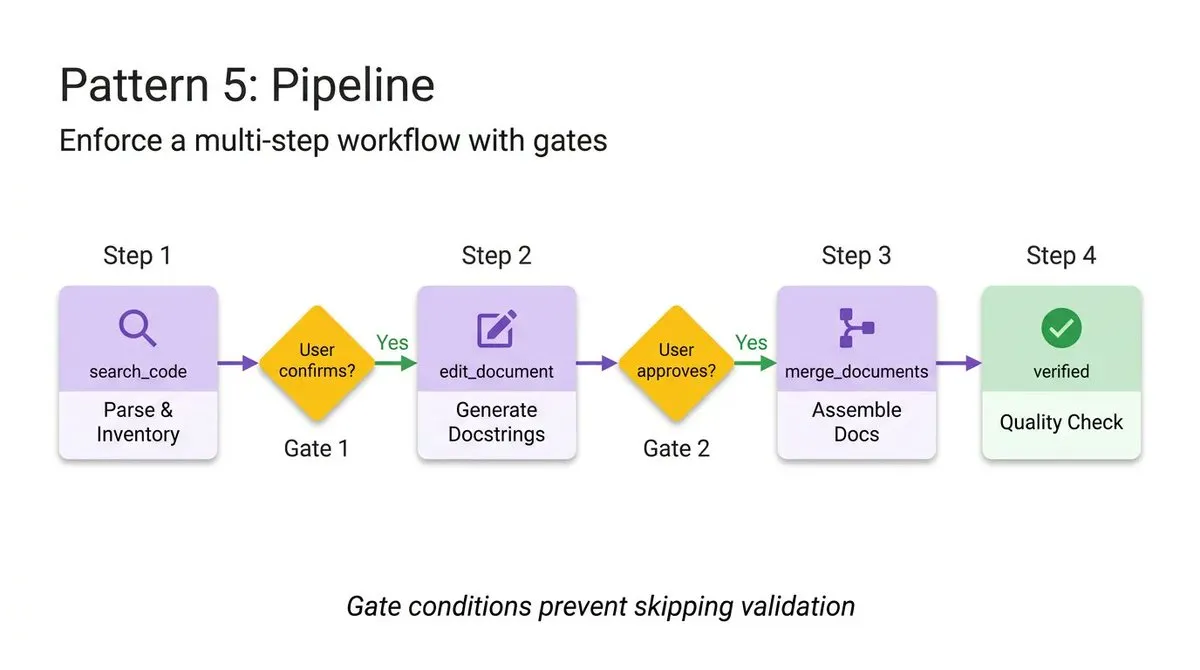
The core of the Pipeline pattern is: Multi-step tasks should be executed in stages, with checkpoints at each stage.
Key points:
- Explicit Checkpoints—Wait for confirmation after each step.
- On-demand Loading—Each step loads resources independently.
- Non-skippable—Prevent users from skipping key steps for speed.
Implementation in beaver-skill
beaver-markdown-i18n was redone after learning the hard way:
Step 1: Scan files → Show scan results → ⚠️ Wait for confirmation ↓Step 2: Generate tasks → Show task list → ⚠️ Wait for confirmation ↓Step 3: Execute translation → Show translation results → ⚠️ Wait for confirmation ↓Step 4: Generate reportEach ⚠️ is a checkpoint. When an error occurs, I know which step had the problem.
Comparing with the theory, my improvements:
| Theoretical Element | My Implementation | Location |
|---|---|---|
| Explicit Checkpoint | 3 ⚠️ confirmation points | End of each step in SKILL.md |
| On-demand Loading | Each step independently loads references/ | references/ files |
| Non-skippable | Do NOT proceed until confirmed | SKILL.md |
Areas for improvement looking back
| Current Approach | Areas for Improvement |
|---|---|
| Manual confirmation every step | Can add a “fully automatic mode,” but keep manual as default |
| Restart entire step after error | Can support recovery from failed chunks |
| No progress estimation | Can show estimated time and cost in Step 1 |
Pattern Combination—Real projects are never a single pattern
My discovery
During my time writing beaver-skill, I discovered something interesting: No skill uses only a single pattern.
| Skill | Main Pattern | Auxiliary Pattern | Why this combination? |
|---|---|---|---|
| beaver-image-gen | Tool Wrapper | Pipeline | Multi-platform + preference setting flow |
| beaver-xhs-images | Generator | Inversion + Pipeline | Outline generation + two confirmations + 4-step process |
| beaver-cover-image | Generator | - | Pure fill-in-the-blank generation |
| beaver-release-skills | Pipeline | - | Release workflow, emphasizing flow control |
My understanding
Generator + Inversion = Generate options first, then let the user confirm ↓ Wrapped in Pipeline = The entire process is controlled by checkpointsbeaver-xhs-images is the best example:
- Generator layer: Generate RedNote image outline based on content.
- Inversion layer: Two user confirmations.
- Pipeline layer: 4-step process, each requiring confirmation.
Inspiration for myself: When designing skills, don’t think about “what pattern to use,” but think about “what problem needs to be solved,” and then you’ll naturally know which patterns to combine.
Decision Guide—Which pattern to use when encountering a problem?
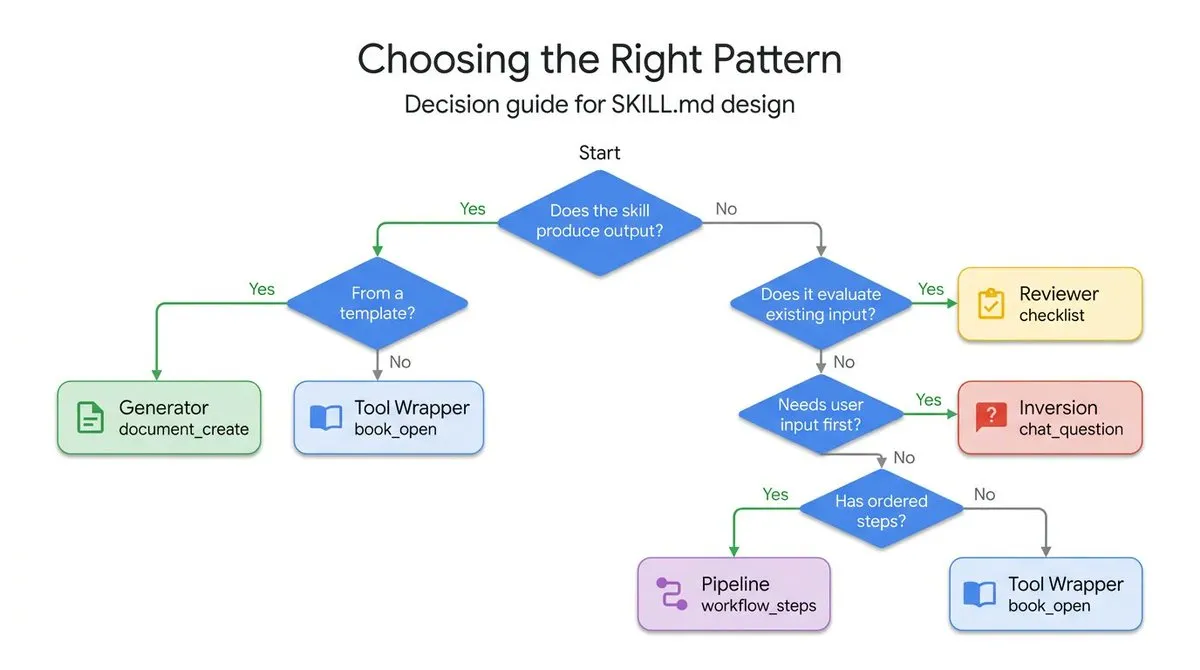
Theory provides a decision tree, but I think a comparison table is more practical. Here is my quick-reference version:
| Problem I Encountered | What pattern should be used | Is there an implementation in beaver-skill? |
|---|---|---|
| Need to support multiple platforms/APIs | Tool Wrapper | ✅ beaver-image-gen |
| Output format is always unstable | Generator | ✅ beaver-cover-image |
| Always guessing user needs wrong | Inversion | ✅ beaver-xhs-images |
| Multi-step tasks are prone to errors | Pipeline | ✅ beaver-markdown-i18n |
| Need to automate code review | Reviewer | 🚧 On the TODO list |
My usage process:
- First ask yourself, “What is the core problem?”
- Find the corresponding pattern against the table.
- See if there is a similar implementation in
beaver-skill. - Copy the structure and change the content.
Final Words—We are all advancing while groping
After seeing these five patterns and comparing them with my own code, I have a few deep feelings:
1. My intuition was right back then
Some things I felt “should be done this way” based on intuition, such as separating docs, step-by-step execution, and asking users more questions. Only after seeing the theory did I realize that these are “design patterns.”
This gave me confidence—since the direction is right, just keep going.
2. Theory showed me where I could improve
For example, fallback mechanisms for platform detection, persistence of style preferences, breakpoint recovery for translation tasks… These ideas were previously just vague intuitions, but now they have clear directions.
For the next iteration, I know what to optimize.
3. We are all exploring in the new era of AI together
Agent development is still a very new field, and there aren’t that many “standard answers.” We are all:
- Groping for direction in the dark.
- Accumulating experience in practice.
- Inspiring each other in communication.
If you are also doing similar things, I hope this article can help you take fewer detours. Let’s advance on this path together.
Reference Resources
- Theoretical Source: Google Cloud Tech - 5 Agent Skill design patterns
- My Project: BeaversLab/beaver-skill
- Skill Reference: jimliu/baoyu-skills
If you are also exploring the path of Agent development, if you have any insights or have stepped into any pits, welcome to communicate. We are all fellow travelers exploring in the new era of AI.
Published at: Mar 19, 2026 · Modified at: Mar 19, 2026