Beaver’s Shrimp Farming Diary · Issue 2
About 2200 words, 8 min read
A Shrimp Farmer’s Hard-Learned Lesson
A friend of Beavers Lab raises shrimp. Yes, freshwater crayfish.
Every day he carefully adjusts water quality, controls temperature, and feeds on schedule. The shrimp grow plumper by the day. Watching a pond full of lively shrimp, he felt like a genius farmer. Until one morning — the aerator tripped overnight, and the entire pond floated belly-up.
He told me something I still remember: “You think you’re raising shrimp, but you’re actually raising risk.”
Later I thought about it from another angle — using AI assistants is a lot like raising shrimp:
You spend months training OpenClaw — it learns your work habits, API keys, preferences, conversation memory, everything stored in that one directory ~/.openclaw. Then one day a disk fails, an accidental rm -rf, or a system upgrade goes wrong — everything is gone.
The shrimp farmer can at least buy a backup power supply for the aerator. AI users? Most people have nothing prepared.
So the beavers built a tool: Beaver Claw Backup (@beaverslab/claw-backup), an insurance policy for your AI assistant’s data.
What This Tool Does
In one sentence: A YAML-rule-based CLI backup/restore tool, focused on AI tool data protection.
Using the shrimp analogy makes it easy to understand:
- Backup = Taking daily photos of the shrimp pond — Pack into tar.gz archives, saved with timestamps
- Rule file = Shrimp farming manual — What to back up, what to skip, written in YAML
- Presets = Beginner shrimp farming kit — Built-in OpenClaw preset, works out of the box
- —yes / —json = Automatic feeder — AI Agents can call it directly, no human supervision needed
Three runtime dependencies, written in TypeScript, MIT licensed, current version v0.6.0. bunx @beaverslab/claw-backup gets it done in one line, without installing anything.
Three Steps to Get Started
Step 1: Create a Shrimp Farming Manual
bunx @beaverslab/claw-backup init-ruleIt launches a nice interactive interface — pick a preset, name it, and auto-generates a YAML rule file:
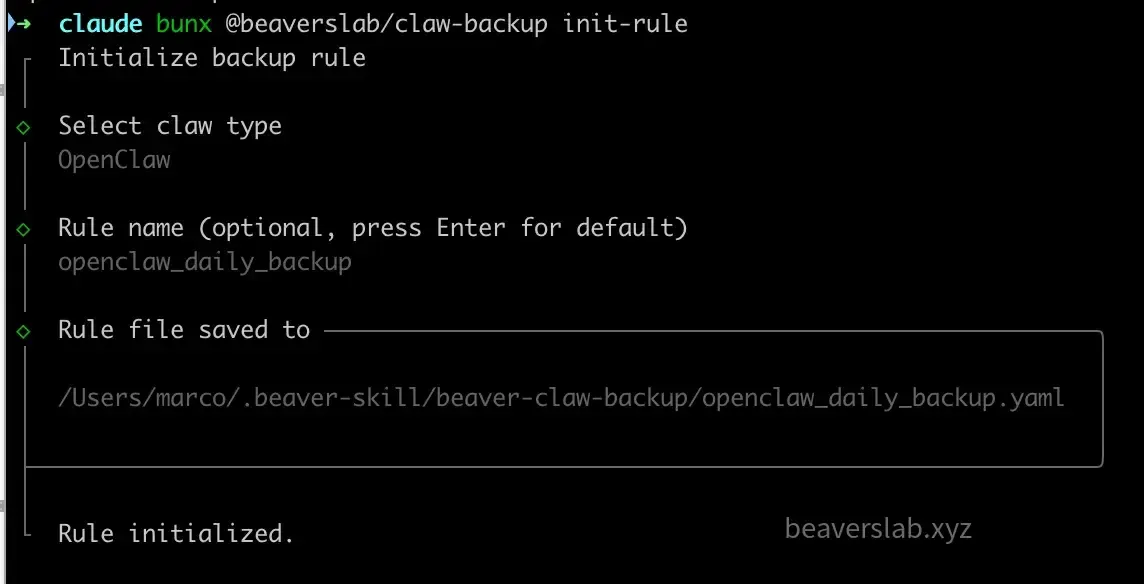
The generated rule file looks like this:
version: 1claw_type: "openclaw"source_dir: "~/.openclaw"backup_dir: "~/claw-backups"restore_dir: "~/.openclaw"include: - "."exclude: - "browser/" - "completions/" - "*.log" - "logs/*"Don’t want interactive? Add --yes for a one-liner:
bunx @beaverslab/claw-backup init-rule --name my-openclaw --preset openclaw --yesStep 2: Take a Snapshot of the Shrimp Pond
bunx @beaverslab/claw-backup backup my-openclaw --yesThe tool scans the ~/.openclaw directory, excludes temporary files per your rules, and packs important data into a .tar.gz archive stored at ~/claw-backups/my-openclaw/202603261200.tar.gz.
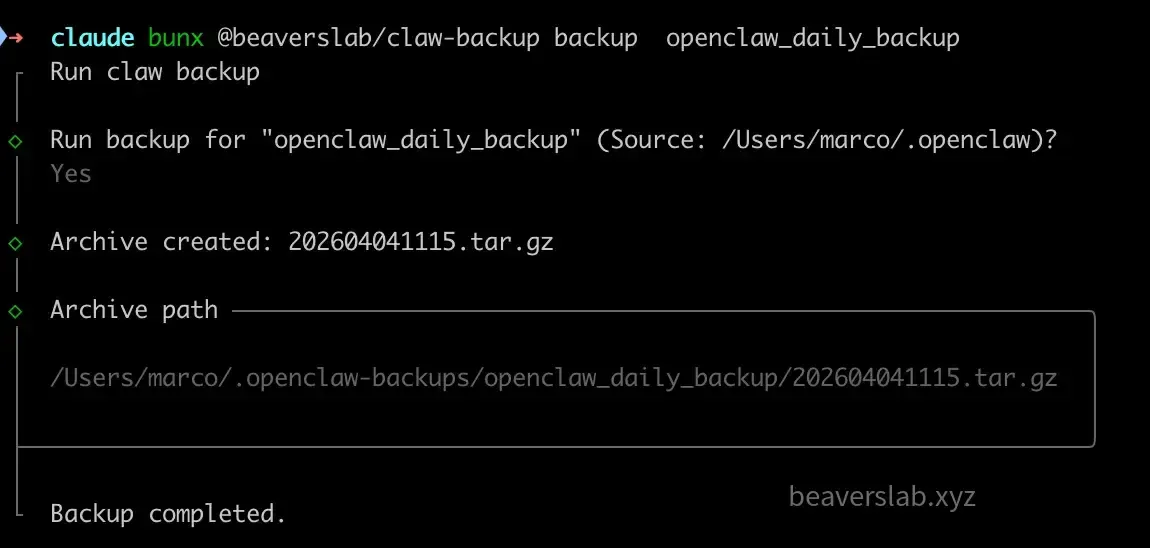
Add --json for structured output:
bunx @beaverslab/claw-backup backup my-openclaw --json# Output: {"success":true,"archivePath":".../202603261200.tar.gz","fileCount":42}Step 3: Restore from Snapshot When Things Go Wrong
bunx @beaverslab/claw-backup restore my-openclaw --yesTwo restore methods:
- Rule-based restore — Give a rule name, automatically finds the latest archive
- Direct extraction — Provide a
.tar.gzpath and target directory, no rule file needed
Safety tip: Rename the original directory before restoring, so you can roll back if something goes wrong:
mv ~/.openclaw ~/.openclaw-before-restorebunx @beaverslab/claw-backup restore my-openclaw --yes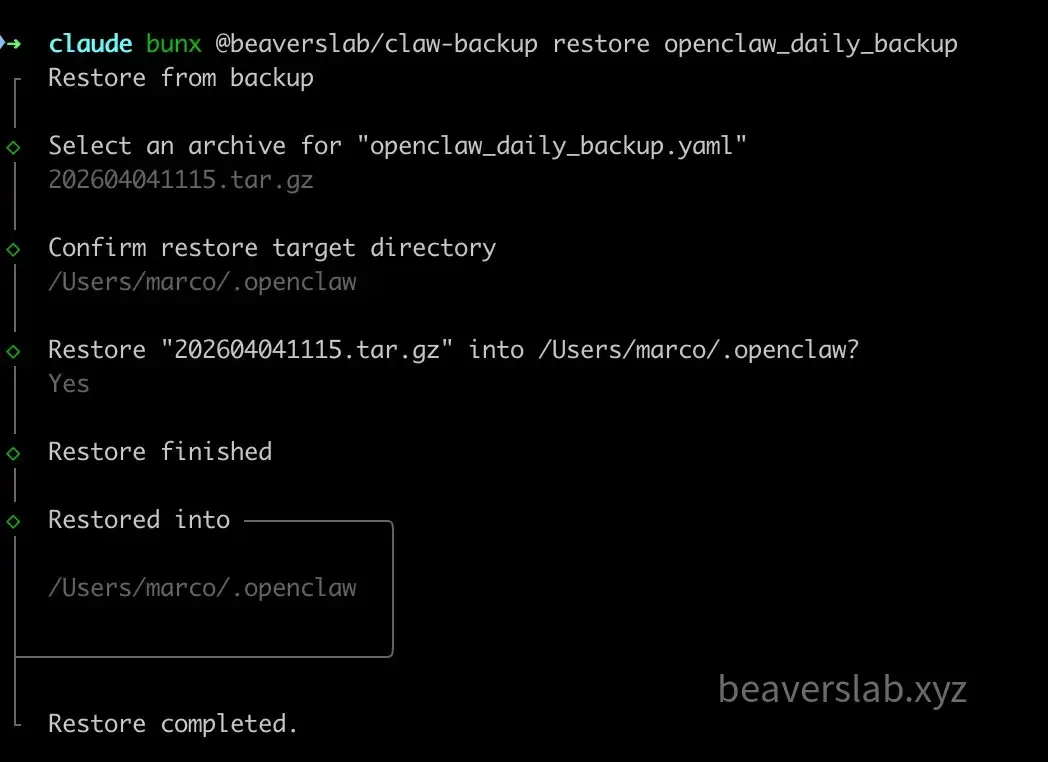
What’s Valuable in the Shrimp Pond
To understand what gets backed up, you need to know what’s inside ~/.openclaw. Like a shrimp farmer taking inventory:
Must protect (core assets):
| Directory/File | Contents | Analogy |
|---|---|---|
openclaw.json | Main config (Gateway, proxy settings) | Pond’s basic parameters |
.env / secrets.json | Environment variables and keys | Farming permits |
credentials/ | OAuth, WhatsApp, Matrix credentials | Keys to sales channels |
agents/<id>/ | Agent config, model settings, session records | Growth record for each shrimp |
workspace/ | Identity definitions (SOUL.md), memory, Skills | Pond’s ecosystem |
cron/jobs.json | Scheduled task definitions | Auto-feeding schedule |
hooks/ | Hook scripts | Water quality monitoring devices |
No need to back up (rebuildable):
| Directory | Why not |
|---|---|
browser/ | Browser cache, auto-rebuilt after restore |
completions/ | Completion cache, temporary data |
*.log / logs/* | Log files, no impact on core functionality |
The design principle is simple: Back up everything valuable, exclude everything rebuildable. Compact archives, fast restores, no wasted space.

Let Backups Run Themselves
Every shrimp farmer knows you can’t rely on manually checking water quality every day. Backups are the same — manual execution will eventually be forgotten.
Option 1: OneDrive Cloud Sync
Point the backup directory to a OneDrive sync folder — one line change:
backup_dir: "~/OneDrive/claw-backups"Every backup automatically syncs to the cloud. Even if the local pond (machine) has an incident, the cloud has a complete record. Version history managed by OneDrive — roll back to any day you want.
Works with OneDrive, iCloud, Dropbox — any sync folder will do.
Option 2: OpenClaw Agent Scheduled Patrol
An even cooler approach: let AI protect its own data.
Configure a scheduled task in OpenClaw to run automatically every night:
bunx @beaverslab/claw-backup backup my-openclaw --yes --json--yes means the Agent doesn’t need to ask you, --json means it can understand the results. Automatic daily backups with patrol reports:

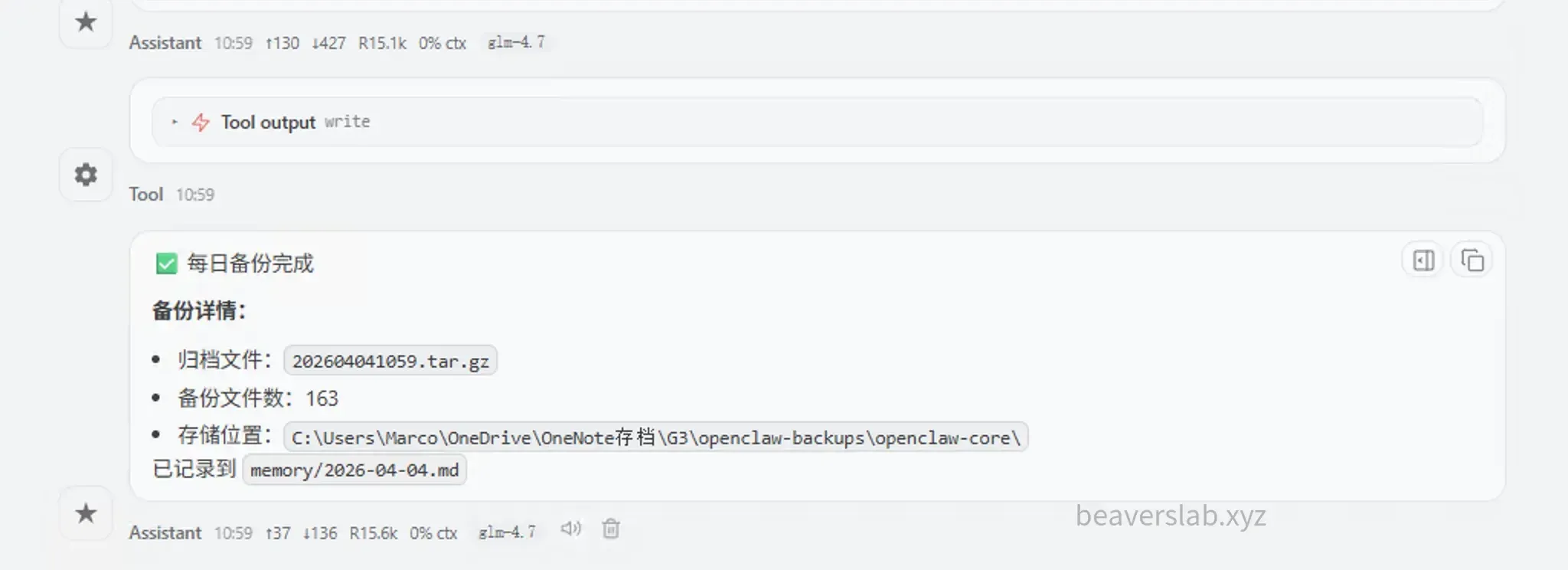
Ultimate approach: Stack both. Agent auto-backups daily + OneDrive auto-syncs to the cloud = hiring a 24/7 security guard with an off-site vault. You don’t need to worry about anything.
How This Tool Was Built
The tool is small, but the beavers think a few design decisions are worth mentioning.
Three Output Modes: Same Code, Three Voices
Same backup logic, three output modes:
┌─ Interactive mode ─── Polished clack UI (for humans) │claw-backup ────────┼─ --yes mode ──── Plain text one-liner (human glance) │ └─ --json mode ──── Structured data (for machines)The key is no separate code paths — just conditional output switching within the same flow:
function outputResult(humanMsg: string, machineData: object): void { if (IS_JSON) console.log(JSON.stringify(machineData)); else if (IS_YES) console.log(humanMsg); // else handled by clack components}Benefit: Core logic across all three modes is always consistent. No more “works in interactive mode but has bugs in JSON mode.”
Gitignore Syntax for File Filtering
Uses the ignore npm package — syntax is identical to .gitignore, nothing new to learn:
exclude: - "browser/" # Exclude entire directory - "*.log" # Exclude all logs - "logs/*" # Exclude subdirectory contentsManifest-Based Archiving
List first, then pack. Temporary manifest file + system tar command, with try/finally to ensure cleanup always happens.
Just Say the Pond Name, No Coordinates Needed
The tool supports three ways to reference rules:
Input "my-openclaw" → Find ~/.beaver-skill/beaver-claw-backup/my-openclaw.yamlInput "./my-rule.yaml" → File in current directoryInput "/abs/path" → Use absolute path directlyOnly Three Wrenches in the Toolbox
The entire tool has only 3 runtime dependencies: @clack/prompts (interactive UI), ignore (file filtering), yaml (config parsing).
With npm supply chain attacks on the rise these days, fewer dependencies means less risk. Three wrenches are enough.
Not a Universal Pump, But a Dedicated Monitor
Claw Backup isn’t a “universal pump” like rsync, much less Time Machine. It’s a monitoring device tailor-made for AI shrimp ponds:
| Dimension | rsync / tar+cron | Time Machine | Claw Backup |
|---|---|---|---|
| AI Agent integration | Not supported | Not supported | —yes / —json |
| Preset system | None | None | Built-in OpenClaw and more |
| Setup cost | System built-in | macOS exclusive | bunx/npx ready |
| Learning curve | High | Low | Low |
In the Beavers Lab tool ecosystem, Claw Backup is the infrastructure layer — protecting data and configs generated by all upper-layer Skills, the safety net for the entire shrimp farm.
From v0.2 to v0.6: The Tool’s Evolution
v0.2 Bought a camera ──── Public release ↓v0.3 Camera can rotate ──── Flexible rule management ↓v0.4 Recordings archived by date ── Tiered storage ↓v0.6 Camera connected to AI ── Non-interactive modeThe trend is clear: from manual to automated, from human use to AI use.
The shrimp farming lesson tells us: Don’t wait until the shrimp are belly-up to remember buying a backup aerator.
bunx @beaverslab/claw-backup init-ruleOne command to insure your AI assistant.
Project: https://github.com/BeaversLab/beaver-skill/tree/main/skills/beaver-claw-backup
npm package: @beaverslab/claw-backup (v0.6.0, MIT License)
Published at: Apr 6, 2026 · Modified at: Apr 7, 2026